Fitting Molecular Dimer
In this tutorial, we learn how to fit QM data of a molecular dimer to determine VDW parameters, demonstrated by methane molecules. To fit a VDW dimer, three models are required: dimer and two monomers. The two monomers may be the same as shown in this example. In practice, valence parameters should be determined before the VDW parameters are adjusted. In this tutorial we will check out parameters from TEAMFF.
The initial parameter PPF file and QMD files for methane monomers and dimer can be obtained following the steps below. For convenience, these files have been prepared and provided in the tutorialB3_fitCluster directory.
Preparing Force Field
-
Start DFF and open the project of
Tutorials.dpf. In thetutorialB3_fitClusterfolder, double-clickCH4.msdandCH4CH4.msdto open the molecular models. -
Select both models in the Project Navigator and use TEAMFF/Checkout to get a PPF file for methane from the
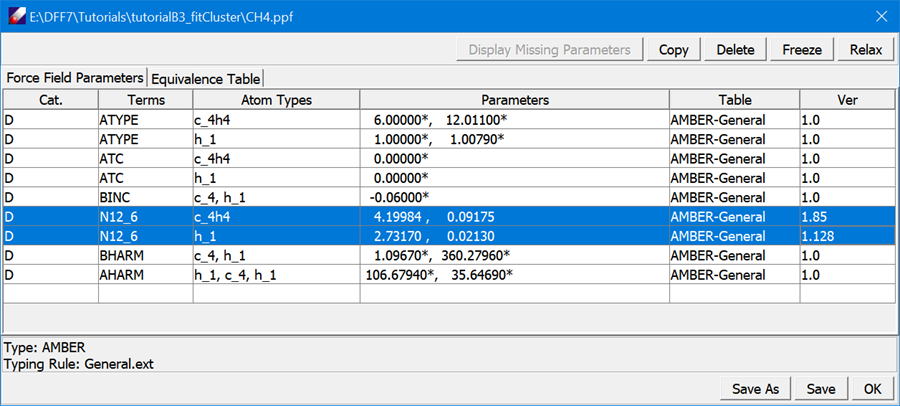
AMBER-Generalforce field table. The result PPF file is loaded to the main screen. All parameters are fixed, indicated by the asterisk (*) sign. Select theN12_6parameters and click Relax in the force field spreadsheet; the VDW parameters are relaxed. Click Save to save the changes, and then OK to close the window.
Preparing QMD
-
Click QM Data/Compute to optimize and calculate Hessians for both models at MP2/6-311++G (2d,2p) level of theory. After the jobs are finished, make a new MSD model file by selecting the Gaussian output file,
CH4CH4.log, and right-click Create MSD in the Project Navigator. -
Double-click
CH4CH4.msdin the Project Navigator to open it. Then select QM Data/Dimer Configurations to open the following dialog:
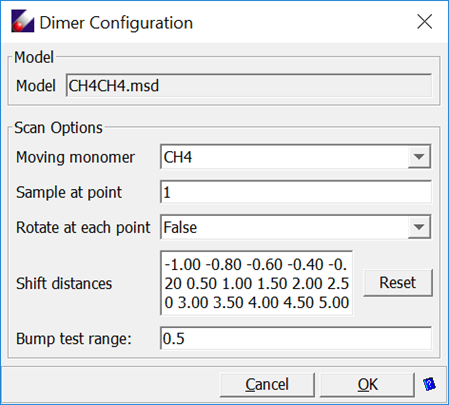
Leave all options as given, click OK to generate models in a subfolder.
This dialog sets the sampling points by shifting and optionally rotating one monomer relative to another. The shift distances in Angstroms are listed as the 'Shift distance'. The values can be manually edited. At each point, the number of random rotations can be changed. This provides a way to sample the intermolecular interactions much more thoroughly. However, limited by the simple functional forms in common force fields, fitting the potential energy surfaces might not be satisfactory.
-
Compute QM data at the same level of theory, MP2/6-311++G (2d,2p), for each of the sampling configurations (there should be 15 sampling points). Select all generated sampling models from the Project Navigator and click QM Data/Compute, set the Computation Type to
GRADIENTand carry out the calculations. -
When all Gaussian jobs are done, make two QMD files:
CH4.QMDfrom the optimized with Hessian calculatedCH4.logandCH4CH4.qmdfrom the optimized-hessian and all sampling Gaussian output files. This can be done by using QMD/Organize QMD to open a new QMD dialog, and then use the Add button to browse and load the Gaussian output files.
Fit VDW Dimer
-
Select both
CH4.qmdandCH4CH4.qmdmodels, which are associated with their MSD files; the MSD files are associated with the PPF file. OpenCH4.ppfto list the parameters in the Forcefield Editor spreadsheet. Make sure theN12_6parameters are relaxed (without the asterisk*mark). -
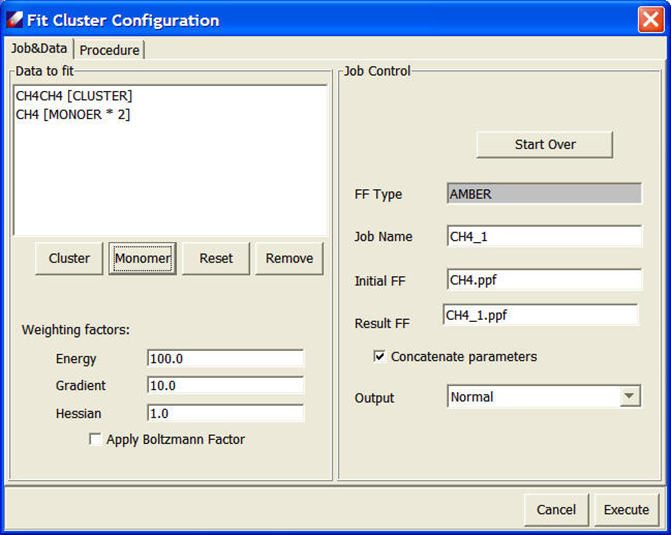
Use Parameter/Fit VDW Dimer to open the Fit Cluster Configuration dialog. Both models are listed in the 'Data to fit' list. We need to identify which one is the cluster and which ones are monomers. Select
CH4CH4.QMDand click Cluster, selectCH4.QMDand click Monomer twice. In the end, the dialog looks like:
Keep other parameters unchanged and click Execute to start fitting. When the job is done, a validation panel will appear:
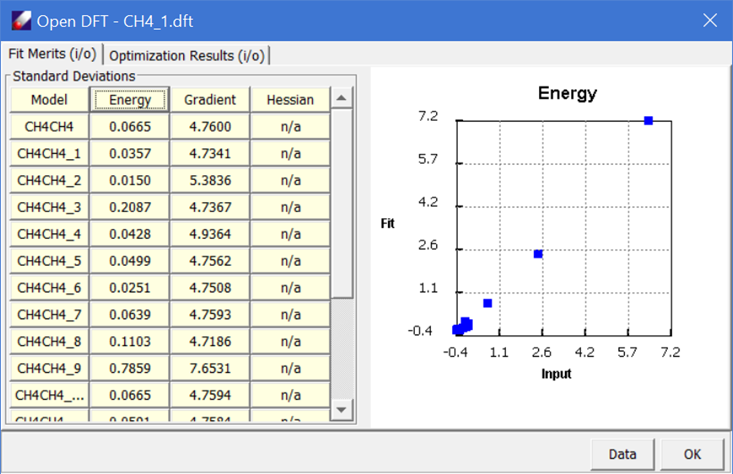
It should be noted that the fit of an isolated molecular dimer is only useful for describing intermolecular interaction in the gas phase. For molecules in condensed phases, the VDW parameters should be optimized using the simulation data as shown in the next tutorial.